Secure all sign-ins
from any device
Privacy Guardian is a password manager that encrypts your passwords before they leave your device. Use the free Chrome browser extension to autofill logins and block trackers with Privacy Shield—plus Overwatch for breach alerts, weak passwords, and your security score.
Your security at a glance
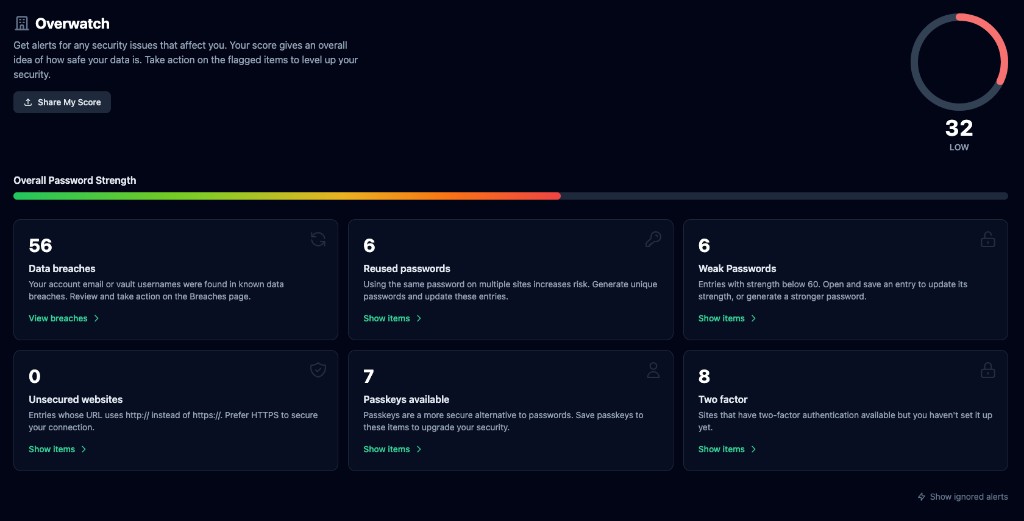
Overwatch gives you one place to see your security score, password strength, and what to fix—from data breaches and weak passwords to reused logins and sites where you can add 2FA or passkeys.
How it works
Create your vault
Sign up with email and choose one master password. Your master password never leaves your device—we never see it, store it, or transmit it.
Add your passwords
Save logins as you browse. When you log in to a site, we offer to save it. Or add entries manually. Everything is encrypted before it's stored.
Fill and go
Unlock the browser extension with your master password. Click Fill to autofill—or let Privacy Shield block trackers while you browse. Done.
Free Chrome extension
Password manager & Privacy Shield in your browser
The Privacy Guardian browser extension brings your encrypted vault to Chrome with one-click autofill, save-on-login prompts, and built-in Privacy Shield—block trackers and ads, see a live block count, score each site for privacy, and get breach warnings before you sign in. Your passwords stay encrypted on your device; we never see your master password or decrypted data.
Autofill & save logins
Unlock once per session and fill usernames and passwords on any site. After you log in somewhere new, the extension offers to save the login to your vault—even after redirects.
Privacy Shield
Block known trackers and ads with one toggle. Allow trusted sites when needed, strip tracking from links, optionally upgrade HTTP to HTTPS, forget site data, or clear cookies when you close a tab.
Site privacy score
See a 0–100 privacy score for the site you're on—based on HTTPS, trackers blocked, breach history, and whether you have a saved login. Know at a glance if a page is worth trusting.
Breach & password health
Warnings on login pages when a site appears in known data breaches. Alerts when you autofill a weak, reused, or compromised password—powered by your Privacy Guardian vault and Have I Been Pwned scans.
Passkeys & sync
Connect the extension to your account with a secure token. Same encrypted vault as the web app and mobile apps—passwords, passkeys, and breach data stay in sync.
Updated block lists
Privacy Shield ships with built-in tracker rules and fetches supplemental block lists weekly—so protection improves without reinstalling the extension.
Install Privacy Guardian for Chrome
Add the extension from the Chrome Web Store, then connect it in Settings → Browser extension with a one-time token. Available on the Chrome Web Store for Chrome and Microsoft Edge.
Password management built for privacy
From passwords and login credentials to breach alerts and a built-in password generator—keep everything in one place and know exactly what to improve.
Overwatch security dashboard
One score, one view. See your overall security health, overall password strength bar, and actionable cards: data breaches, reused passwords, weak passwords, unsecured sites, passkeys available, and 2FA to set up.
Data breach monitoring
Check your account email and vault usernames against Have I Been Pwned. Get a dedicated Breaches page with expandable lists and full breach details so you know what was exposed and when to change passwords.
Password generator
Create strong random passwords or memorable passphrases. Choose length, character types, avoid ambiguous characters, and see strength before you save. One click to copy into your vault.
Weak & reused password alerts
We flag entries with strength below 60 and detect when you reuse the same password across sites. Open and save an entry to refresh its strength; use the vault filters to see weak or reused items and fix them.
End-to-end encryption
Your vault is encrypted with AES-256-GCM before it ever reaches our servers. We cannot read your passwords—only you hold the key. Your master password is used to derive an encryption key; it is never stored or transmitted.
Browser extension + Privacy Shield
Install the Privacy Guardian extension for Chrome or Firefox. Unlock once per session and fill any saved login with one click—plus built-in Privacy Shield blocks trackers and ads, scores each site for privacy, warns you about breaches on login pages, and flags weak or reused passwords when you autofill.
Privacy Shield in your browser
Block trackers and ads with one toggle. See a live count on the extension icon, allow trusted sites when needed, strip tracking from links, optionally upgrade HTTP to HTTPS, forget site data, or clear cookies when you close a tab. Block lists refresh weekly.
Save as you log in
When you successfully log in to a new site, we prompt to save it. No need to remember to add it later. The extension appears right after login—even after the page redirects—so you never miss a save.
Organize with folders
Group logins into folders—Work, Personal, Banking, Social—and filter by folder in your vault. Keep hundreds of passwords organized without scrolling forever.
One master password
Remember one strong password. We take care of the rest. Use "Keep unlocked for this session" in the extension to avoid typing it repeatedly. Lock manually when you step away.
Web and extension
Manage your vault in the web app—add, edit, delete, search. Use the extension for quick fill and save. Same encrypted data, synced everywhere. More platforms coming.
Why use a password manager?
Data breaches, phishing, and weak passwords put your accounts at risk. A password manager is the simplest way to stay secure.
Prevent account takeovers
Billions of passwords are exposed in data breaches every year. When you reuse the same password across sites, one leak can unlock your email, bank, and social accounts. A password manager lets you use a unique, strong password for every site—without memorizing them.
Stop password fatigue
The average person has over 100 online accounts. Reusing weak passwords like "Password123" or slight variations makes you an easy target. Password managers generate and store complex passwords for you.
Protect against phishing
Phishing sites mimic real login pages to steal your credentials. A password manager only autofills on the real site you saved—it won't fill on fake copies. Even if you click a malicious link, your credentials stay safe.
Simplify your digital life
Strong passwords are long and random—impossible to remember across dozens of sites. With Privacy Guardian, you create one master password, and we handle the rest. Autofill, search, organize. Never type a password again.
Security and privacy by design
We built Privacy Guardian so you never have to trust us with your secrets.
Zero-knowledge encryption
Your master password and encryption key never leave your device. We use PBKDF2 with 310,000 iterations and AES-256-GCM. Even if our servers were compromised, attackers could not decrypt your vault.
No tracking, no ads
We don't use analytics, advertising, or third-party trackers on our service. Your vault data is encrypted. We store only what's needed to sync your encrypted vault across devices.
You own your data
Your passwords are yours. We don't sell, rent, or share your data. Delete your account anytime and your data is removed from our systems. Read our Privacy Policy for full details.
Ready to get started?
Create your free account. No credit card required. Your first step to a more secure digital life.
Already have an account? Log in